
Index
Email marketing remains an essential tool in the arsenal of any digital marketing strategy. In this regard, Mailchimp has become one of the most popular and effective platforms for managing email campaigns.
It has an intuitive interface and versatile functionalities, which is why it has positioned itself as a fundamental ally for companies, entrepreneurs and marketing professionals. In this Mailchimp guide, we will explore step by step how to make the most of all the features offered by this platform.
First steps: Create an account and set it up
The starting point is to create an account. The process is simple: just go to the official Mailchimp website and follow the steps to register.
Once you have your account, it is essential to set it up properly. This includes adding company information, logo and contact details.
Domain verification is also crucial to ensure authenticity and improve mail deliverability.
Subscriber list building
The creation of subscriber lists or data model configuration for customer management is a fundamental part of any email marketing strategy. In Mailchimp, this is done by creating audiences.
It is important to establish which fields of information we will need to require from our Contacts. This information will be relevant when configuring the different campaigns, so that we can correctly segment our audience and send relevant content to specific groups of subscribers, thus increasing the effectiveness of the campaigns.
Once you have defined the information fields for each Contact tab, you can import Contacts from CSV, excel files or add them manually.
Design of effective campaigns
At Reinicia we have a protocol to follow before you start sending emails without any rhyme or reason:
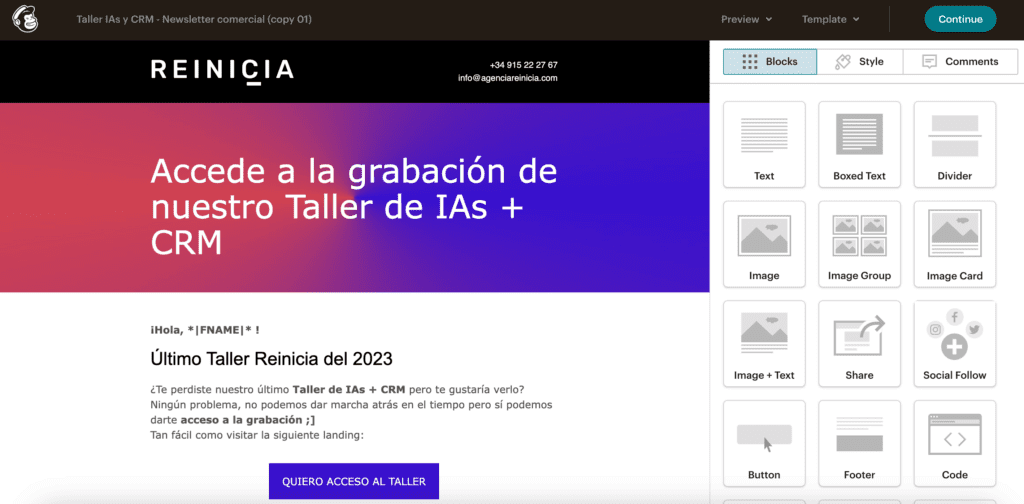
- Design of a basic template
We recommend creating a template with 7-10 blocks of content, which can be: events, articles, training, news, certifications, new additions, etc. All this in text, image or GIF format, using the various editing modules provided by Mailchimp.
Based on this template, the different campaigns will be configured, removing or modifying modules as needed. In this way, all the brand’s emails will follow the same line and visual identity, regardless of who logs in to the Mailchimp account to edit them.
- Content plan
When the email template design is approved, it is time to define and plan the campaigns on a semi-annual basis. This will be done in a document that includes the following points for each mailing:
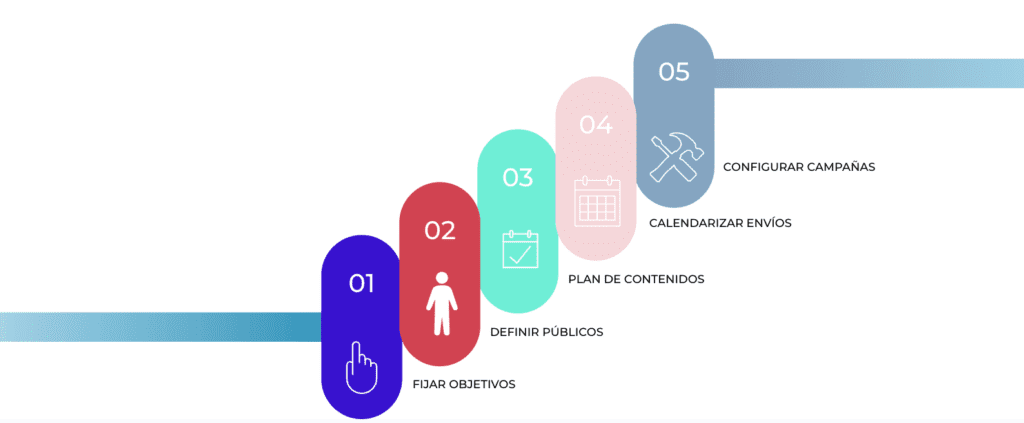
What is our objective for each mailing
2. Who do we want to target
3. What information we want to share with them
4. When we are going to give it to them
5. Campaign execution
For example:
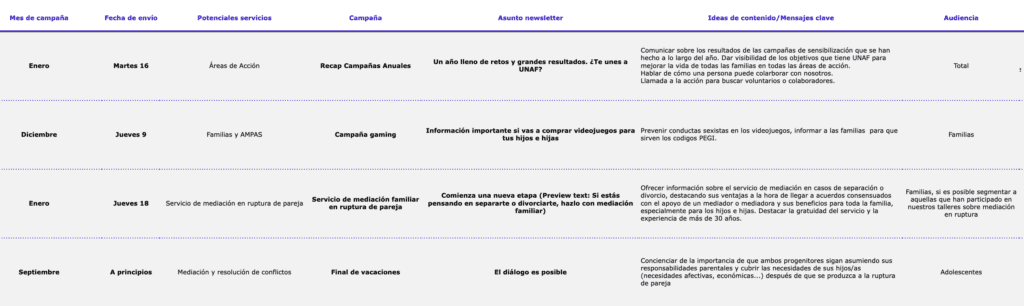
Creating an email marketing content plan is important because it provides a strategic structure that guides email marketing activities over a significant period of time.
This long-term planning allows for better coordination of campaigns, balanced distribution of content and promotions, optimization of time and resources, and facilitates the evaluation of results over time for continuous adjustments and improvements. In addition, doing so on a semi-annual basis provides consistency in communication with subscribers, fosters long-term relationship building with the audience, and contributes to efficient and effective brand management in the email channel.
Email Marketing Course with Mailchimp
Automation and workflows
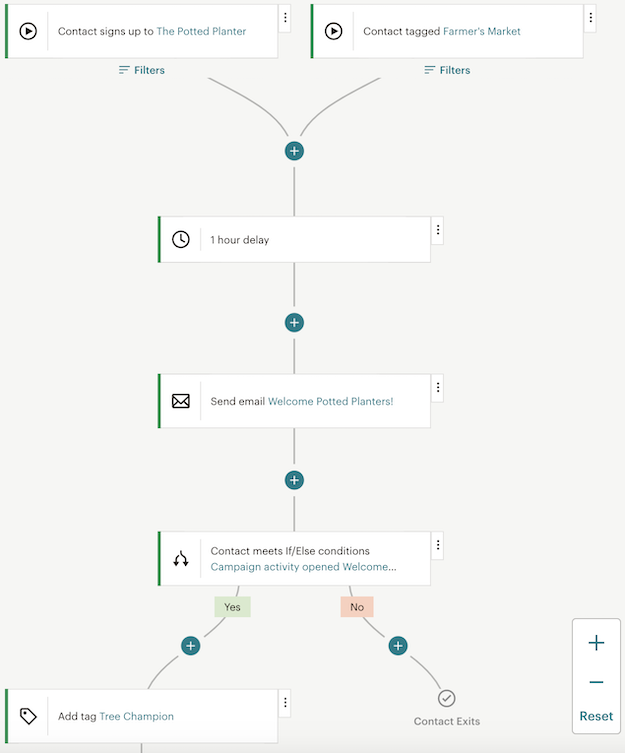
Workflows, workflows or“customer journey” (as Mailchimp calls them) allow you to set up a series of automatic actions in response to subscriber behavior. From sending a welcome email when someone subscribes to creating email sequences based on specific actions, such as opening an email or downloading a resource, automation streamlines the process and increases the relevance of the content.
Results analysis and optimization
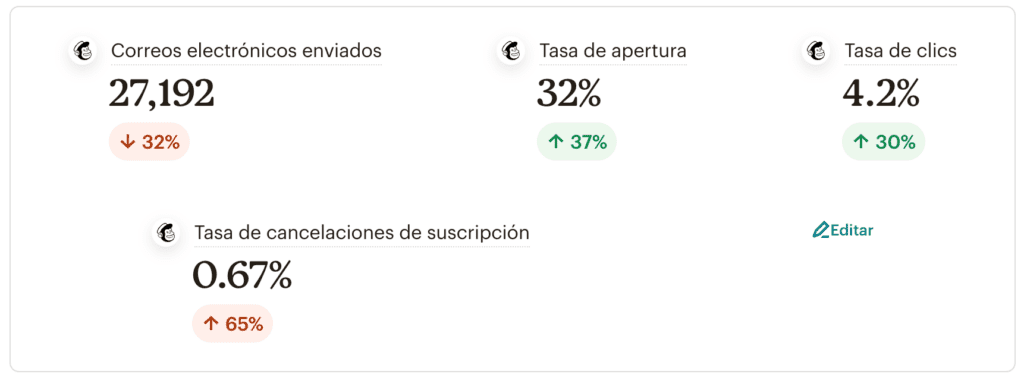
Mailchimp offers comprehensive tools to analyze campaign performance. Detailed statistics show key metrics such as open rates, clicks, conversions and unsubscribes.
This information is essential to understand which strategies work best and which aspects need to be adjusted. From these analyses, A/B tests can be performed to test different approaches and constantly optimize campaigns.
Compliance with regulations and best practices
Compliance with privacy regulations and good emailing practices are fundamental aspects of any email marketing strategy.
Mailchimp provides tools to comply with laws such as GDPR and the CAN-SPAM Act, as well as offering recommendations on best practices to avoid being labeled as spam.
Integrations and compatibility
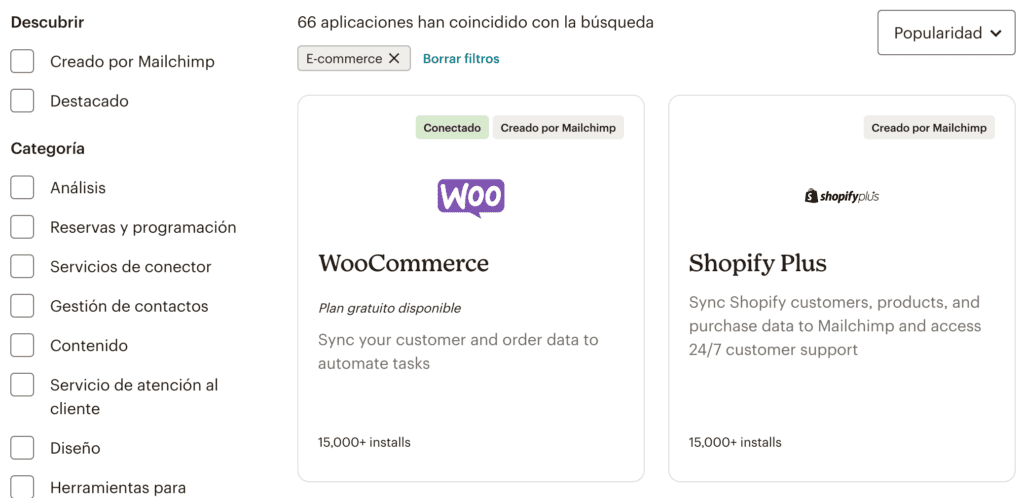
Mailchimp integrates with a wide range of applications and platforms, making it easy to synchronize data and automate tasks between different tools. This flexibility allows you to connect Mailchimp with CRM systems like Zoho, e-commerce platforms like Shopify, social networks and more, thus expanding the possibilities for campaign outreach and personalization.
Support and learning resources
In addition to its user-friendly interface, Mailchimp offers educational resources such as tutorials, webinars and an extensive knowledge base. Technical support is available to resolve questions and issues that may arise while using the platform. This combination of tools and support makes Mailchimp accessible to beginners and advanced users alike.
This versatile tool allows marketers to effectively manage their email campaigns. From audience creation to marketing automation and performance analysis. It has everything you need to optimize and continuously improve your email marketing strategies.
At the end of the day, successful email marketing is not just about sending emails, but about connecting with the audience in a meaningful way and providing value through relevant and personalized content.
En Reinicia somos partner oficial de Mailchimp y podemos ayudarte a lograr precisamente eso. ¿A qué esperas para empezar a utilizar esta herramienta? ¡Haz brillar tus campañas de email marketing!