
After the first article on Twitter we leave you with this one with more details in which you will discover what you should do to interact with other tweeters in your environment and thus get your content to reach a greater number of people. Undoubtedly, this is the most complicated part of managing any social network, but it is also the one that will allow you to obtain tangible positive results for your business.
We also tell you how to plan your Twitter posts to get the most out of the time you will have to spend on Twitter.
Public relations
Following and followers
Following is the action of following someone on the social network and followers are the followers. Getting followers is not always easy: a first tip is not to practice “follow for follow” because this type of followers have no real interest in our channel. The best strategy is to publish quality content, interact with users of related topics, encourage interaction, be original, varied and constant.
Private messages
This feature allows you to contact tweeters discreetly, but you should not abuse it, as some may consider that you are violating their privacy. If you are going to use it and you do not know the person in question, it is advisable that it is to make a really valuable proposal.
Direct messages can be accessed from the Twitter header, in the Message tab. The window that will pop up contains the messages received and sent, as well as the option to send a new one.

Lists
Twitter lists allow you to group a group of tweeters according to their interests or topics they talk about. This way you can follow their updates more closely. You can also view the lists to which your profile has been added.
There are public lists that can be consulted by any user from our profile. We can also subscribe to other people’s lists to follow them. With private lists only we can
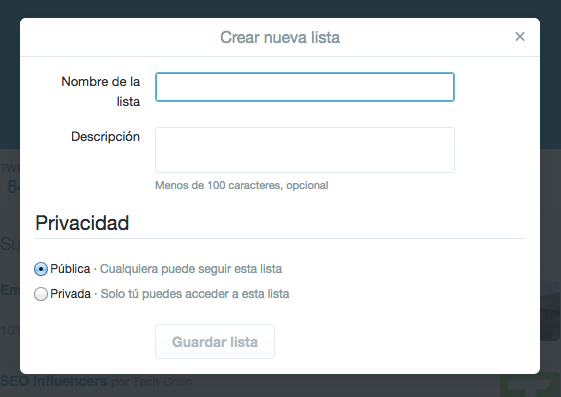
To create a new list, go to the Lists tab from your profile, at the top right of the screen, where our image is, and click on the Create new list button. You can give it a name, description and choose whether it will be public or private.
Favorites
Favorites are used to mark tweets from other users that have caught our attention. It can be

Notifications
The Notifications section groups all mentions, new followers, retweets, messages marked as favorites by other users about our tweets, if we have been added to lists, etc. Any movement is recorded here. It is possible to differentiate between notifications that reach us from all tweeters or only from those we follow.
It is important to be aware of notifications and respond to everyone or interact in some other way, for example by RTing their posts or bookmarking one as a favorite. This way you will establish a relationship with other tweeters. Remember that if you don’t interact frequently, people will stop interacting with you.
Programming of publications
Planning: content plan
What is the ideal frequency to post on Twitter? This will depend a lot on your target audience and your ability to generate content. We recommend a minimum of 1 tweet per day and a maximum of five. Not counting retweets, replies or favorites. This way there will always be content but we will not saturate users.
How to do it? With planning. The ideal would be to
Important: Always leave room for improvisation, tweet about a hot topic of the moment, respond to users who interact with the account and make interesting retweets.
Once you have chosen the topic and thought about the message, you have to take into account the details of the publication: who to mention, if it will include an image, a link, what hashtag to use… You can do the planning in an excel document, especially to clearly see the publication dates. Then, you can dump it in applications such as Hootsuite, designed to schedule social networks.
Thematic calendar
A good working methodology is to think of a different theme for each day of the week and repeat it. For example:
Periodicity and timing
After a few months of tweeting in different time slots, analyze when you get the most responses: morning or afternoon? early morning or evening? Based on the results, adjust the timing of your tweets.
However, you will have to wait until you have some followers to be able to draw reasonable conclusions. At least 100.
Automatic replies and autotweets
There are external tools that allow you to program automatic responses that are very useful in certain cases, such as a welcome message via Direct Message for new followers. Some examples are:
To schedule tweets so that they launch themselves at the desired date and time, you can use applications such as Hootsuite, mentioned above. In addition, you can add photos, links, mentions or show the location.
Saved searches
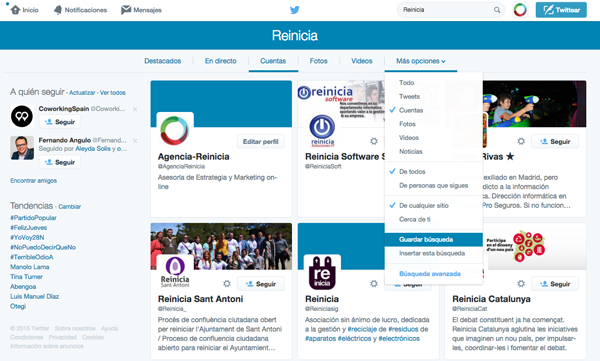
Searches are made in the upper right bar. Entering it takes us to another page where the results appear. They can be viewed by Accounts, Photos, Videos, the last tweets that use those words and the highlighted ones.
On-line reputation
Applied to brands, you can store the variants of a brand, so you can tell when someone mentions a name without tagging them in the message. This way you can track a brand’s online reputation on Twitter and monitor what other people are saying.
Photo and tweet tagging
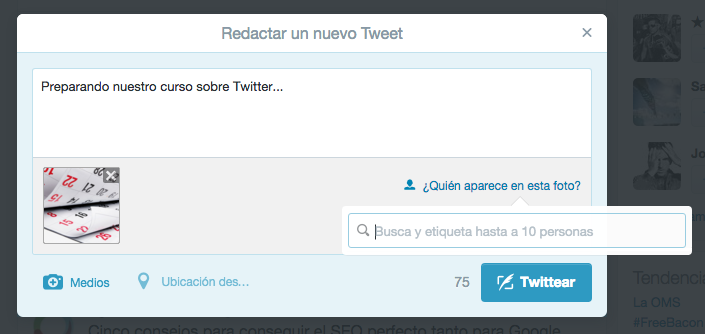
Tagging other tweeters in our photos is another type of mention, since the rest of the users can see it, but it also serves to get more responses: those tagged will start a conversation, RT or mark as Favorite.